Showing posts with label Tips and Tricks. Show all posts
Thursday, April 2, 2015
Step by step instructions to Get the Most Out of Google AdWords For 2015
Some would say in case you're a little while ago looking to best practices for 2015, then you're behind the pattern and behind your rival. Yet its preferred late over never. Who knows? Perhaps your rivals are generally as occupied as you and haven't discovered time to get up to speed with web promoting. I run into it constantly. Here is your opportunity to make a New Year's Resolution and show signs of improvement with Google AdWords. So what are the best practices for Google AdWords in 2015? How about we dive into it.
What Should I Spend?
How fruitful would you like to be? Have you heard the expression – you get a greater amount of what you concentrate on? The measure of cash you are willing to put resources into your AdWords battle is a key component of what you can hope to get. I am putting it all on the line here and will say that any crusade that is under $100 every day is a misuse of exertion. I've seen individuals begin battles on $20 – even $50 every day and not get sufficient clicks to give significant information or changes. With little plans, one can rapidly see their ROI diminish. Furthermore, obviously, on the off chance that you aren't getting the outcomes you believe that you ought to be getting, who do ya fault? It's not the tightwad who needed to get enormous comes back from a little plan. Having a little plan can be similar to having a delightful Ferrari F4 and issuing it just a quarter tank of gas. You won't go far.
How Do I Build a Campaign?
Every battle ought to have its own financial plan. At the point when do you make another battle? A decent dependable guideline is to partitioned AdWords battles by topography. On the off chance that you have diverse urban communities or even states where you are advancing distinctive nearby extensions or retail outlets, and so on it bodes well to separate promotions crusades between every store. You will likewise need to have a different hunt just battle and a showcase just crusade and on the off chance that you need to perform re-showcasing, then you got it; you will need a different crusade for that also. The purpose behind the different crusades is on account of each of these sorts of promoting carry on in an unexpected way.
How would I Build an Adgroup?
On the off chance that you haven't made sense of this yet, Google rewards important substance. A best practice is to make Adgroups with firmly themed subjects much the same as you would arrange your block and mortar store. So for instance: a crusade would be Shoes and the adgroups would be men's shoes, ladies shoes, youngsters shoes, and so forth. Evaluate the spend of every individual notice aggregate inside every battle. Inside every Adgroup have no less than 3 promotions; one utilizing element catchphrase insertion, another utilizing an inquiry and every one of them utilizing no less than one essential word from your watchword list and with a solid invitation to take action, other than call now or click here. These invitations to take action are excessively clear and Google doesn't care for it and in this way punished promoters who utilize these.
Get Dynamic
In September of 2014, AdWords dispatched the most impactful overhaul for e-trade sponsors since the arrival of Dynamic Remarketing. This upgrade was the arrival of advertisement customizers, which permit promoters to add element substance to their content advertisements. This element substance can be anything from stock or cost to a commencement until a particular occasion. This works exceptionally well in the event that you have a large number of items that always show signs of change. Give Google a datafeed of all your item data and set offers based upon data contained inside that nourish. With element look promotions, Google gets the data it needs from your site and you target groups of onlookers based upon that data. Much like with Google Shopping, verify you start with a notice gathering focusing on "All pages" and set your offers low here. A low offer is imperative on the grounds that it prevents DSAs from taking activity from existing hunt crusades (something you truly need to evade). The exact opposite thing you need to do is go up against your own particular advertisements. Regularly it additionally bodes well to take each chance to utilize notice augmentations, for example, call, get out, area, social, audit and site expansions. These give your advertisements more innovativeness and separate your promotions from the ocean of similarity seen on the SERPs.
Get Shopping Campaigns
On the off chance that you have items to offer, you NEED to exploit Shopping Campaigns, once in the past known as Product Listing Ads (PLA). These promotions can outflank content hunt advertisements on the grounds that they demonstrate the picture of the careful item a customer is searching for at the time they are prepared to purchase. Basically make an information nourish with each bit of item data to show with the item posting including a decent quality picture so customers see precisely what they will be purchasing. This is still an under used Google item and can have a constructive outcome for your general crusades in 2015.
Overseeing Keywords
I've expounded on magic words in another article so I won't go into as much detail here. As you add to your catchphrases and keep them firmly identified with the adgroups you will rapidly figure out which terms are producing clicks and changing over guests to clients. As your crusade collects information, you will focus in on the essential words driving the strongest ROAS, or, Return on Ad Spend. Utilizing the catchphrase reports, you will have the capacity to distinguish and develop these top performing essential words with like-terms. In the meantime, you will stop or erase decisive words that are failing to meet expectations. You will likewise figure out which magic words are driving movement which are insignificant and need to be added to the negative essential word list.
Since Google disposed of accurate match sorts in 2014, you no more need to fabricate comprehensive arrangements of plurals and incorrect spellings. AdWords now performs that with wide match naturally. Google brings up that "nearby magic word varieties get a normal of 7 percent more correct and expression match clicks with similar navigate and transformation rates."
Shouldn't something be said about Bid Management?
Nearly connected to your spend are your commercial and pivotal word offers. Regularly you need to have your commercial show inside the initial 3 advertisement situations accessible, by and large. Advertisements appearing in the #4 spot or lower is a solid flag that the promotions need to be changed or the offer needs to be expanded. You can tell by taking a gander at the first page recommended offer segment. In the event that your promotions or decisive words are failing to meet expectations because of obliged plan, Google will demonstrate that in the status segment. I like to be in the 1 – 2 spot and offer as needs be. You can oversee offers with the advertisements and in addition decisive words.
You can likewise include offer modifiers for area and gadget. You can expand the offers by a certain sum and Google will utilize that offer for the closeout. This is useful to win positions for scans on cell phones or for clients near to your store and acquire them to purchase. You can likewise abatement offers in the same manner. How about we say's you need to diminishing offers as individuals are further from your store so the advertisements show for pertinent groups of onlookers inside a certain range from your area, you would put an area offer modifier on the promotion.
Testing
ABT – Always Be Testing. Showcasing is about persistent testing. Give a crusade no less than 3 months prior to calling it a disappointment. Make a battle with no less than 3 adgroups and 3 advertisements every adgroup and 7-8 magic words every adgroup. This permits you to deal with the crusade and test the different segments, for example, the feature and portrayal lines and also the watchwords. Begin little with changing one thing at once and tweaking as required.
These are the best practices (As I see it) for showing signs of improvement results with AdWords for 2015. In the event that you differ I'd love to peruse your remarks beneat
Wednesday, April 1, 2015
Powerful Tips for Using Facebook To Boost Your Ecommerce Store
With more than 1.5 billion enrolled clients, a figure consistently rising, Facebook is a long range informal communication powerhouse. It's worth more than the yearly yield of numerous nations and has clients from all over the globe. The measure of information Facebook has, and the subtle element with which individuals readily impart data about them on Facebook, makes it any advertiser's fantasy stage. Simply take a gander at some of these details.
Facebook has more than 1.5 billion enrolled clients.
More than 699 million individuals log into Facebook consistently.
A normal individual spends around 15 hours and 33 minutes on Facebook consistently. This makes it an aggregate of 700 billion minutes universally.
More than 2.5 million sites have coordinated with Facebook.
Right now there are a great many Facebook pages where individuals are offering items specifically to their fans. While its not generally the best methodology to depend totally on Facebook for ecommerce deals, it positively can be a piece of your more extensive ecommerce arrangement.
In the event that you have an ecommerce site or an online store, you can utilize the force of Facebook to achieve your target clients substantially more adequately and drive them to your online store and help deals.
Here are a couple of tips for utilizing Facebook to reinforce your ecommerce store.
1. Substance is the King – Even on Facebook
Quality substance is the lord all around. Anyhow the sort of substance that resounds with Facebook clients is altogether different from site substance or articles. Here, on the off chance that you compose 1000 word notices, not very many of your fans will have the persistence to peruse till the end.
Facebook clients like short, appealing, outwardly engaging and activity situated posts made in a fun manner. Over all your posts ought to give clients esteem. Exhibit your insight about your corner and items in your announcements.
Additionally, don't be fixated on your own item pictures, connections and blog entries constantly. Frequently impart stuff from different web journals and sites that your fans may discover helpful (not from your rival's webpage, obviously).
2. Advance Your Store for Facebook Engagement
Your ecommerce store ought to additionally be improved for most extreme Facebook engagement (Likes, Comments, Shares). You can do that in various ways. Offer sign up through Facebook. Verify your store's item pages have obviously unmistakable online networking imparting gadgets. Add the Facebook remarks gadget to your item pages so that the client remarks are unmistakable on their Facebook profiles too. Include a little proclamation underneath the item pictures urging clients to impart on Facebook.
These are fundamental things yet numerous ecommerce stores don't have them set up in view of which they neglect to exploit Facebook.
3. Utilization Engaging Descriptions and Smart Calls To Action
At whatever point you add new items to your store, you'd no doubt offer them on your Facebook page. When you do that, verify you include a connecting with 1-2 line depiction with your connections. Drawing in or appealing portrayals drive more clicks when contrasted with straightforward connection offers.
Utilize high engagement words as a part of your posts. Examination demonstrates that notices that incorporate the words Facebook, Why, Most, World, How, Health, Bill, Big, Says and Best get most engagement and shares. So also,
Posts with under 80 characters draw in 23% more engagement.
Utilizing emoticons expands remarks by 33%.
Inquiry posts get 100% more remarks.
Quotes get 26% more Likes and 19% more imparts.
Likewise, make your portrayals activity arranged and add clear suggestions to take action with them. Facebook as of late presented the "Add Call to Action" choice with announcements. Continuously utilize it with your announcements and connection offers.
4. Support Sales With Contests, Deals and Special Offers
Facebook clients adoration challenges and rebate bargains. Running rivalries is discovered to be the best engagement system for ecommerce stores. Just about 35% clients "Like" Facebook pages to take an interest in challenges. So issue them what they need. Make inquiries and utilization "Like for Yes, Comment for No" sort methods for input. These little fun exercises can support your engagement altogether.
5. Concentrate on High Quality Visual Content
I've officially said the significance of substance, yet visual substance merits a different notice. Facebook clients love visual substance like pictures, data illustrations, features, pics and so on. Picture based substance gets very nearly 40% more collaboration when contrasted with basic content posts.
However to get the best results, you have to stir up your overhauls with a blend of content just, text+image and picture/feature just upgrades. For ecommerce stores, item pictures get the most noteworthy engagement.
6. Run Targeted Facebook Advertisements
There's no better paid notice mode for ecommerce stores than Facebook ads. Facebook Ads have enhanced definitely throughout the last couple of years. They're much more straightforward to design as well as bring significantly more focused on results when contrasted with other commercial modes. You can target clients in light of their area, engages, sex, in the same way as/aversions, late action, pages preferred and many other criteria. Begin with a little plan of around $50 and test diverse advertisements to see what functions admirably for you. When you see how it functions, expand your financial plans progressively.
7. Improve the Buying Process
One vital thing is to make the installment and purchasing process as basic as would be prudent for your clients. Regularly ecommerce stores add a connection to the item pages with their Facebook announcements. There's nothing incorrectly in doing this, however since it includes various redirections, there are high risks that purchasers would forsake the buy mid-path through. A brilliant alternative is to utilize a direct connection to the checkout page or, stunningly better, utilize a Facebook application to acknowledge installments straightforwardly on Facebook. There are a few Facebook ecommerce store applications where you can design your items for direct offering on Facebook.
8. Use Facebook for Customer Support
An incredible approach to demonstrate your fans and imminent purchasers that you think about them, is to move the client backing to your Facebook page. Ask clients to impart their item criticism, compliments/dissentions and concerns of your Facebook page. Effectively react to such remarks, and guarantee fast issue determination. This will demonstrate the world that you truly think about your clients.
9. Utilize a Combination of Manual and Automated Posts
Most ecommerce stores serve clients having a place with numerous nations, because of which they have to work in distinctive time zones. Obviously you can't stay on Facebook constantly. So its prescribed that you mechanize some of your presents on stay in contact with clients from untouched zones. You can utilize the BufferApp or HootSuite for this reason. Anyhow continue posting physically too.
Examination demonstrates that the engagement levels are 18% higher on Thursday and Friday, and 32% higher on weekends. Consistently, around 1PM gets the most imparts and 3PM gets the most clicks. Remember these time spaces and days while booking your mechanized posts.
Conclusion
Like some other informal organization, Facebook flourishes with client engagement. The all the more nearly you draw in your crowd through fantastic visual substance, challenges and remark reactions, the more activity you'd have the capacity to drive from them. Anyhow recollect that your objective is to course clients from your Facebook page to your store, in light of the fact that that is the place you can change over them into supporters –your biggest online asset.
Tuesday, March 31, 2015
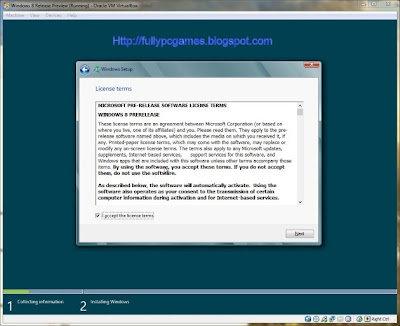
How to install Windows 8 Step by Step
1.Download Window 8 Download 32bit / Download64bit
2.Burn Iso File To Dvd With Burning Software
3. After Install Window your all data will be lose C:// Drive.1st store data in safe place.
4.Now Put dvd On your dvd room and run setup or restart pc or laptop with boot DVD
then setup show on your screen so follow These Screen Shot.

![]() | |
| Click "Install now" |

Put Product Key
TK8TP-9JN6P-7X7WW-RFFTV-B7QPF

Installation is now complete Enjoy.
Don't forgot leave your comments
I Am Waiting For Your Response.
How To Make 100% Free Mobile Phone Calls From PC
1)How To Make Free Calls With Yahoo Messenger?
You can make a free call from your personal computer (PC) to mobile phones at any where in the world. To make a free call you need to have an earphone with mike and internet connection with yahoo or Skype software installed. Just follow the below instructions to make free calls and it is not applicable for United States. If you don’t have Skype or Yahoo messenger then download and install the latest version of it from Google.
Step 1: Sign into your yahoo messenger or Skype using yahoo id and password and configure your earphone and headset if you have installed a fresh yahoo or Skype software.
Step 2: Inside your Yahoo messenger dial +18003733411 and press enter (As shown in the below figure)
Step 4: Now a recorded welcome message greets you along with an advertisement. It will ask you to select one of the Free411 service. Just listen to the options until the last one as “Free Call”. After hearing the last option don’t press any number in key board. Then say “Free call” loudly on your microphone connected to your PC.
Step 5: After this, they will run a short advertisement of their sponsor and make sure you don’t press any number at this time.
Step 6: Wait until you here a beep sound after the following message “Please dial the phone number country code first, don’t forget to dial 1 for North America”. After hearing message, dial the destination number of your choice immediately along with the country code. (E.g. for North America it’s 1 and for India it’s 91).
Step 7: Now your call will get connected and you can talk up to 7 minutes for free. After 7 minutes the call will disconnect. Repeat the same procedure to talk again.
There is no limit to make free calls. So enjoy this trick to make free international and local calls. It even works to make free local mobile calls in India.
2)How To Make Free Calls With globfone ?
GlobFone is a completely FREE service that allows you to call or text your family and friends around the world. All you need to do is to dial the number. You don’t need to pay, register or install anything .When it comes to calling you don’t have to install anything on your PC, simply dial the country code and the number where you want to call.All you gotta do is to view a short commercial and the company gets revenue out of it.No need of even registering and signing up.You can also send free sms with globfone any were in the world.click here to make free calls with globfone
Sunday, March 22, 2015
HOW TO FIND AND SORT HIGH PAGE RANK PAGES IN SEARCH ENGINE RESULTS PAGE
Discover High Page Rank Pages in Search Results:
To begin, download and introduce SEO Quake. Restart your program on the off chance that you are on Firefox program then go to www.google.com, sort site:dofollowblog in the hunt box and press ENTER. You will get that blog pages in your list items. Case in point: Here we need to discover high page rank dofollow online journal pages. We will utilize page rank 4 dofollow blog as our case. In the Google pursuit box sort the accompanying. site:www.freebloghelp.com You will get the indexed lists from that site, you will likewise discover SEOquake toolbar included underneath every query output.
The most effective method to Find and Sort High Page Rank Pages in Search Engine Results Page
From the SEOquake toolbar you can discover critical SEO parameters, for example, Google Page Rank, Google Index, Google Links, Alexa rank, Twitter tweets, Facebook likes and then some. Here we just need Google Page Rank take a note of it. Starting now and into the foreseeable future can discover page rank in query items page i.e. without going by the genuine page to discover page rank.
Sort your Search Results taking into account Page Rank:
Presently we will perceive how to sort these query items in view of Google Page Rank. In the query items page at the top you will discover Sort toolbar as demonstrated in the picture beneath.
The most effective method to Find and Sort High Page Rank Pages in Search Engine Results Page
In the Sort toolbar you will discover two shafts in every area, one directing upwards and other guiding downwards. Here we need to sort pages taking into account page rank, with the goal that high page rank pages come up and low page rank pages go down the request. Move your mouse to the PR: segment on the Sort toolbar and press UP shaft. You will find that high page rank pages are moved to the top and low page rank pages are moved to the base i.e. in slipping page rank request. Presently you have all the high page rank pages at the top for simple access. Go visit every page and remark on that blog page to get high page rank back connection to your website. Restricted your Search Results: Normally when you look for pages on locales you will get classification pages, label pages, month to month chronicle pages, yearly file pages thus on which are not required for us. So we ought to square these pages from showing up in our indexed lists. To piece these pages we will utilize overlook charge as a part of our Google look. Simply add prefix "-" to the statement to disregard pages demonstrated in list items. For instance: Type the accompanying in the Google look. site:freebloghelp.com -classification -tag -clients -websites -file –page From the above summon, in the list items page you will find that class pages, label pages, document pages are overlooked, so you don't see them showing up in indexed lists. This helps you to thin your list items and to get the real substance that you nee
Subscribe to:
Posts (Atom)